There is a lot to consider when building a social media app, and especially in today’s world, where there are so many apps serving the same purpose, it can be difficult to keep the social media game fresh and exciting to attract your target audience.
If you are looking to launch a social media app, but don’t know where to start, this blog is just for you. With the help of our expert SaaS software developers, we have created a detailed guide where we tell you everything you need to know to get started on your app building journey, from a step-by-step process to all the latest social app trends that can help you gain an edge.
Whether you have the next Instagram-level idea or just want to create a space for a niche target audience, building an app requires careful planning and a team that understands both design and user experience.
Here are six key steps for making a social media app:
Step 1: Start with the Discovery Phase
Before you jump into the technical part, a.k.a the designing and coding phase, you need to have a clear roadmap of what, why and who the app is for. Step 1 is all about the discovering, where you start off by asking questions like:
- Who is your target audience?
- What problem is your app solving?
- Are there competitors already doing this?
This is also the stage where you define your value proposition. Think of it like this: why should someone download your app over the other options they have? If you can nail this, you will be able to save yourself from a lot of guesswork (and potential losses) down the line.
Step 2: Define the Core Functionality
Now that you know why you are building the app, let’s talk about what it should do. Do users need to post photos? Like and comment? Follow each other? Add stories or go live?
Here is a tip: start small. Pick a few core features that are essential to your app’s experience. This is what is called a Minimum Viable Product (MVP), in which you focus on one or two features that are serving the basic purpose of the app. Once your app is up and running, and you have the resources and time, you can tweak existing or add new features.
Step 3: Prototyping and UI/UX Design
This step is more than just making things look pretty. It is about making the app easy and enjoyable for your audience to navigate through. No one enjoys a lagging app, or having to click on multiple links to get where they want to be. This is where good UI (user interface) and UX (user experience) really matters, because you want your users engaged and to find things quickly so they don’t lose interest.
You will first have to create wireframes (rough sketches of your app’s layout, which could be on paper or digital), followed by high-fidelity designs that show the final look and include all the features that you want in your MVP. You can use tools like Figma or Adobe XD to prototype and test early.
Step 4: Time to Start Development
Now the real building begins. Your developers will take the designs and turn them into a working app. There are three core things involved in developing an app, which are:
- Frontend (what users see)
- Backend (how everything works behind the scenes)
- APIs (to connect the above two, and to third-party services like Google Maps or Facebook login)
This step is an iterative process, and the best way to go about it is to constantly get feedback at every step and make changes accordingly. This way, you won’t have to wait until the very end to test whether your audience will use the app.
Your social media app will serve multiple users simultaneously so you may want to check out our guide: Everything you need to know about multi-tenant architecture.
Step 5: Test and Deploy
On the surface, your app might look great and have all the right features, but until it’s tested, you won’t know how it actually performs. QA (quality assurance) testing helps find bugs, glitches, and usability issues before real users get their hands on it. This includes testing across devices, checking loading speeds, fixing crashes, and more.
Once you have ensured that your app is working smoothly, you are now ready to launch it on the App Store and/or Google Play.
Step 6: Post-Release Support
A successful app isn’t just built once and forgotten. After release, you will continuously need to dedicate resources and time to:
- Fix bugs that users report
- Release updates
- Add new features based on user feedback
- Monitor server performance
This ongoing support is what keeps your users happy and loyal, and keeps your app alive in a very competitive space.
Read also: How to Build a SaaS Product: Comprehensive Step-by-Step Guide
It is a great exercise to distil your social media app by categorising your social media app, so you know exactly what purpose it serves and who the intended audience will be.

1. Social Networking App
Social networking apps are social media platforms created to connect people online. These social networking apps can be for personal networking like Facebook, for professional social networks like LinkedIn, or to date like Tinder.
For social networking apps like Facebook and LinkedIn, all content forms (text, video, image, live videos, and stories) work great and they are designed for people to engage with the content through sharing, comments, and reactions. The features of such social networking apps allow people to engage and build networks with other people with similar interests, for instance, groups, trends, liking pages etc.
2. Photo-Sharing Apps
As the name suggests, photo-sharing apps are social media apps specifically for sharing photo content. Instagram and Snapchat are the two leading photo-sharing social media apps. Since these apps are for photo-sharing, their features and design flow is geared around it, for instance, Instagram’s double-tap like feature, photo editing and filters feature on Snapchat and Instagram, or the grid layout for Instagram.
3. Video-Sharing Apps
Youtube, TikTok, and Vimeo are the most popular examples of video-sharing social media apps. These apps are created for video hosting, viewing, and sharing. Their distinct features like channels, subscriptions, playlists, likes, and comments allow users to view and engage with video content of their interests and customize their feed.
4. Microblogging Apps
Microblogging is a combination of blogging and instant messaging that enables people to share short and instant content with an online audience. Twitter and Tumblr are the leading microblogging social media apps today that enable quick and casual exchange between users. Their unique features like retweets/reshare, threads, hashtag trends, and message word limit are what sets them apart from other social media app ideas.
5. Discussion and Community Forums
Discussion and community forums are another popular category of social media apps that are created for users to ask questions and engage in discussion with other users online. Quora and Reddit are two great examples of discussion and community forums. Such social media apps are more “topic-specific” and they are designed for more textual content.
6. Social Review Networks
Social review networks like Yelp, TripAdvisor, and Influenster are social media platforms used by people to review and share information about products, services, businesses, travel destinations, and more. The value that they offer to people are the reviews as they help people learn from other people’s experience and make informed decisions.
7. Interest-Based Networks
Interest-based social networking apps are social media apps that are specifically built for users with a particular interest or hobby. For instance, Goodreads is a famous interest-based network for people who are interested in reading books. Such social media apps aim to allow people to connect with others around a shared interest and hobby – focusing solely on a single subject only.
8. Blogging and Publishing Apps
Blogging and publishing apps like WordPress and Medium are social media platforms built for people who like ‘blogging’. Such apps allow people to write content and share it with the world and build their own network of readers and followers. These apps are also an important part of the content marketing strategy for businesses so they write and spread the word about their products and services.
9. Collaborative Economy Networks
Collaborative economy networks, also known as ‘shared economy’ networks, are social media platforms to find, buy, sell, share, and advertise products and services. If you have a product or service, for instance, a bed-and-breakfast, a niche network platform like Airbnb can help you reach the target audience for your business. Another example is Rover, which is a niche network for dog owners to find dog sitters and walkers.
10. Anonymous Social Networks
Anonymous social networks are not the most popular kinds of social media apps but they are unique because they allow users to post content anonymously. Two popular examples are the Whisper and ASKfm apps. Such social media apps are meant for fun and casual content and are targeted more toward the younger audience.
Read also: How to build a travel app
So you have a roadmap of what and how you are going to build an app. However, it is also important to know how much it will cost to make it. When it comes to the costs of developing any kind of app, be it a social media app or a fitness app, there are several factors in play that determine the final cost.
On average, a basic social media application or MVP can cost anywhere between £10,000 to £65,000, and a full-scale social media application with added features can cost upwards of £100,000.
However, the actual cost of development will vary based on numerous factors. For example, the idea of the app itself, the design workflow, the number of features, the size of the intended user base, and pages (or what the developers refer to as ‘screens’) of the application.
Reach Out To Us To Get An Estimate For Your Project
Our analysts can help you get a quote for your social media app.
Get a quote
When developing an app, you have to understand the difference between basic features that are absolutely needed, and the other non-essential but important features you can include to enhance the user experience of your app.
Below we have discussed the must-have features of a social media app.

User Signup and Social Authorisation
The first must-have feature of a social media app is ‘User Signup’ – which allows people to register for your app and use it. You should always simplify the process of signing up to your social media app, otherwise, if it is a complicated process or involves too many steps, it can become annoying and turn people away. You should always offer more than one way to sign up, for instance, through email and password and/or phone number and password, and offer an option to reset the password too.
Social authorisation is another crucial feature for user signup that basically means that users can sign up using their other social media accounts like Facebook or Google. This helps transfer their personal information like full name and profile picture from their other accounts. Developers use technologies like Facebook or Google SDK for this must-have feature.
User Profile
Another must-have feature for how you create a social media app is to have a feature for a user profile that allows users to edit and update their personal information like name, profile picture, location, gender, and more. Every user profile should be searchable so that other users can look them up and it should have options such as contacting the user, sending friendship/following/subscription requests, and viewing their media files or posts.
Content Feed
The content feed feature is one of the main features to consider if you are wondering how to make a social media app. A feed is important because, in most cases, it is the home screen for your social media app where the user lands after logging in. It is where they see posts and updates from other users and stay connected with others. How and what posts show up on the content feed depends on different algorithms and logic that work behind the screen to shape the content feed. It is also important to have a feature to refresh the content feed so users can catch up with the latest posts.
Search Function
Search features help users look up posts, people, and other kinds of content on the social media app. This is an important feature that needs to be done right so that users can search for people and content that they are interested in through tags, keywords, username, location, or any other filters. An efficient and comfortable search function redefines the user experience and makes it easier for users to build their social network by following/liking what they are interested in.
Post Creation
Most social media apps have features to allow users to create their own posts, like Facebook and Instagram, but it can vary depending on the concept of the social media app as well. Depending on your app idea, specific features for post creation are another must-have. A well-thought-out post creation feature that allows users to create posts based on text, images, videos, or geolocation makes the social media app more appealing for users.
Post Engagement
You also need to have some features that allow users to engage with posts, such as the post like/unlike or react feature, the feature to share other users’ posts on your own profile, and the option to comment or reply to comments on the post. These forms of engagement between users and the content are what build the social network and help users interact and socialise with each other.
In-App Communication
Another way for social media app users to interact with each other is through in-app communication features such as direct messages or a chat messenger. A very basic in-app chat should have at least 3 basic functions: (i) write and send messages to other users on the platform in real-time; (ii) a list of all chat messages and message history with time and a user avatar; (iii) push notifications for new message alerts.
Push Notifications
Push notifications for new community posts, engagement on your posts, new messages, new followers/subscribers/friends and similar activity are a way to keep users updated with the newest happenings on the social media app. Therefore, it is advisable to have a push notification module integrated into your social media app so that users stay in the know. Users should also be allowed to change the settings for and subscribe or unsubscribe to push notifications as per their preference.
Analytics
A basic social media app should be integrated with at least some analytical tool like Google Analytics. User analytics reports are necessary for admins to track and evaluate the performance of their social media app. These insights can also guide your marketing strategy to make your social media app more successful. There are a wide variety of paid and free social media tools available that you can consider for your social media app.
User and Content Management
A social media app requires some level of user and content management on the part of the admins. Using CMS tools can help admins manage and filter users and content, registrations, and reported content. It is important to have features for admin login and logout, and to remove and sort out reports and claims.
The aforementioned features are the minimum of what is required to develop a social media application. If you are wondering how to make a social media app that offers more than the basic features, you can always go all-out on additional features and customized design elements to elevate your social media app.
However, if you are considering testing the market with your social media app product then these features are all that you need to develop a Minimum Viable Product (MVP). In the first phase of product development, you can launch an MVP and gather feedback from the market and user base which you can use in the later phases of development to develop the social media app further. This is a well-suited development practice if you are wondering how to create a successful social media app. Especially if your social media app idea is truly innovative and you are unsure about the market response it will receive upon launch.
Social app trends
We discussed some core features above that are essential to get you started with a minimum viable product. However, if you are looking to take your MVP to the next level, there are a range of additional features trending amongst social media users today. We have discussed some of these below:
Augmented Reality and Face Filters
This is a trend that caught up, especially after the success of social media apps like Snapchat. When Snapchat was first launched in 2011, its wide range of augmented reality filters, geo-filters, and added effects became integral to Snapchat’s unique brand identity. Users could easily modify their photos by applying the fun filters and added effects with a swipe and share them with friends. This soon became an interactive and engaging way of communication, especially amongst the younger generation, and took over the traditional messaging. Owing to the huge success of filters and augmented reality, other social media apps like Facebook and Instagram hopped on to the trend and added them to their social media apps.
So if you are wondering how to create a trendy social media app, then adding AR and face filters feature to your app is a good way forward. For this, you need to use specific AR tools and technologies such as the ML Kit and AR Core.
Content Editing
Integrating editing features, especially photo and video editing features, is another way to attract users. Most social apps today including Facebook, Instagram, Snapchat and WhatsApp allow users to edit their photos and videos before posting them online. As an additional feature, you can offer in-app editing features such as rotating and cropping pictures, making collages, snipping videos, or editing the speed and audio tracks of videos.
Live Streaming
Most popular social media platforms like Facebook, Instagram and Twitter have a live videos feature and it is another trendy feature to consider for your social media app. Live streaming connects people in a real-time shared experience where users can stream live videos and chat with other users on live video.
Stories – Ephemeral Content
Ephemeral content is the type of content that stays visible for a limited amount of time (e.g. 24 hours) before it disappears from your feed. Snapchat, Instagram, and WhatsApp stories are some of the most common examples of ephemeral content. Stories are a great way for users to share candid and casual day-to-day events with their followers. That is why they are such a popular feature for social media apps today.
A Parting Tip
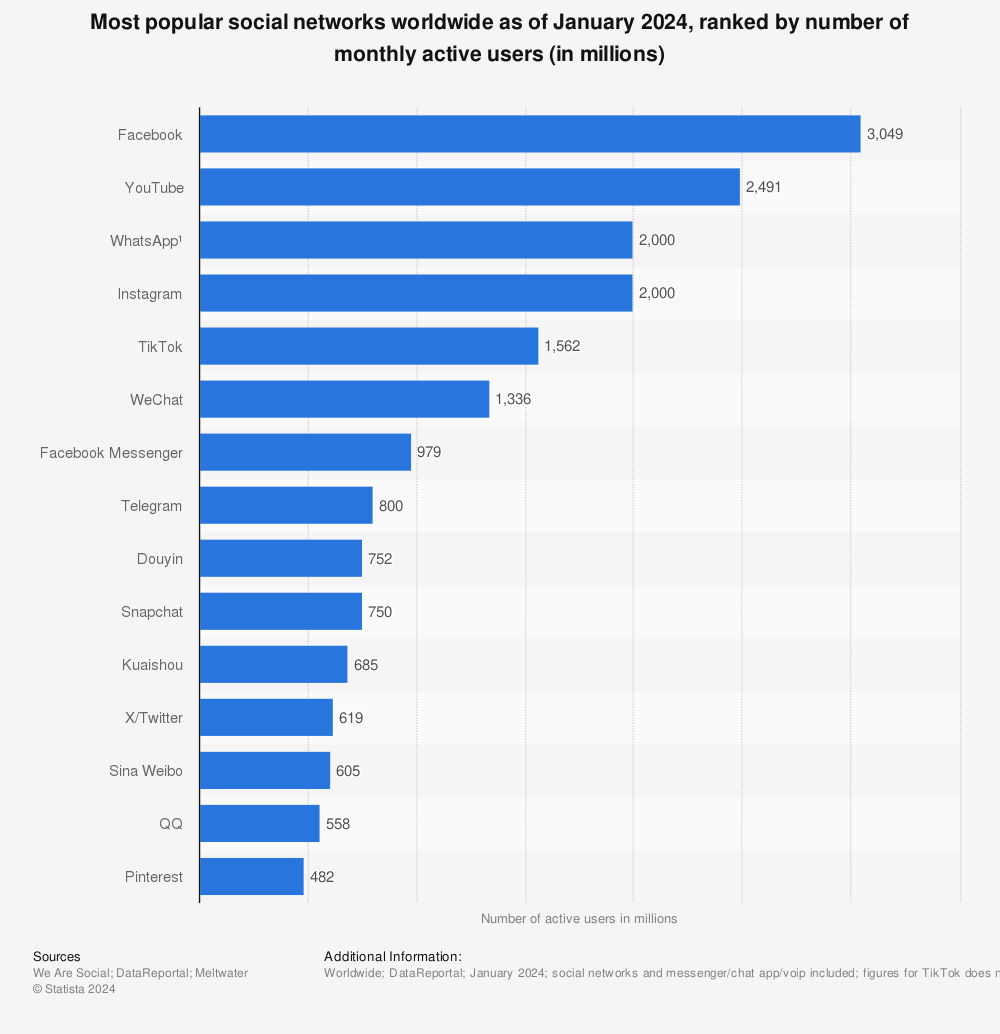 Based on Statista’s report, this is how social media usage varies between some of the top social media apps. It is clear that despite the thousands of apps that are built everyday, Facebook is still the most popular one to this date.
However, this is where startup and tech companies are often misled. They try to build an app that is similar to those that are popular. However, the key to having an app as successful as Facebook, is to not make an app like Facebook.
Instead, come up with an innovative idea and stand out from the rest. Just as Snapchat proved itself to be a one-of-a-kind app that grew so popular, that many other apps like Facebook and Instagram incorporated Snapchat features into their own apps.
If you have an idea, but don’t know where to start, you can reach out to us.
FAQs
How to build an app like TikTok or Instagram?
To build an app like TikTok or Instagram, you’ll first need a clear idea of what features you want, like video sharing, likes, comments, filters, or messaging. Then, work with a development team to design the app’s look (UI/UX) and build both the front-end (what users see) and the back-end (where all the data lives). You’ll also need good servers, strong content moderation, and a plan to keep your app running smoothly as more users join.
Can AI create a social media app?
AI can help with parts of the process, like designing app screens, suggesting code, or improving user experience with smart recommendations and chatbots. But it can’t build the whole app on its own just yet. You’ll still need real developers and designers to bring everything together and make sure it all works the way you want.
How hard is it to create a social media app?
It’s definitely doable, but not easy. You need time, money, and a skilled team. The hardest parts are making sure the app looks great, works on different devices, can handle lots of users at once, and keeps everyone’s data safe. If you are new to this, it helps to start small with basic features, then grow over time.
Why is creating a social media app a profitable idea?
If your app offers something unique and keeps users engaged, it can make money in many ways, like showing ads, offering premium features, or partnering with brands. Social media apps grow fast if they catch on, and people spend a lot of time on them, which is great for business. The key is solving a real need or creating a fun space where people want to come back again and again.


